Founders: Build a 5 Field Decision Rights Matrix in an Afternoon
Founders: Set up a searchable 5 field decision rights matrix in an afternoon. Capture decision, context, owner, and revisit triggers.
On this page
- What Is a Decision Rights Matrix (Decision Journal) and Why Teams Need One?
- What Should a Decision Log Entry Actually Contain?
- Where Should You Actually Keep the Log?
- Who Owns the Log, and How Often Should It Get Reviewed?
- How Do You Turn the Log Into Actual Learning?
- Getting Started: Build a Working Log in an Afternoon
- How to Design the Roles Behind Each Entry
- Where Decision Logs Break Down (And How to Fix It)
- What Does a Decision Log Look Like Across Different Teams?
- How Should the Log Evolve as the Team Grows?
- What Do You Actually Gain From Running One of These?
- What I’d Tell a Founder Setting This Up for the First Time
- Try Betlog: The Structured Way to Track Every Bet You Make
- Sources
In this article, a decision rights matrix means a decision journal, a compact, team-focused record of choices that preserves context, tests assumptions, and speeds up how fast your team learns. It is not an org chart. The core promise is simple: a permanent, searchable log of what you decided, why, and what you expected to happen stops teams from repeating the same expensive mistakes. Below is the 5-field template and a same-afternoon setup checklist.
TL;DR:
- Decision logs should be updated immediately when a decision is made, capturing context, alternatives considered, the person responsible, and revisit conditions.
- Use simple, structured tools like a wiki or shared document with a permanent link, avoiding platforms like Slack that hinder search and linking.
- Assign a rotating owner to ensure regular reviews, with revisit triggers set by specific metrics, dates, or assumptions to avoid stagnation.
- Regular short review sessions and onboarding use of decision logs help identify patterns, improve reasoning, and accelerate team learning.
- Start with a five-field template and logging key decisions promptly to build a habit that enhances speed, reduces debates, and prevents repeated mistakes.
What Is a Decision Rights Matrix (Decision Journal) and Why Teams Need One?
A decision journal is a running record that captures the decision itself, the context you had at the time, the alternatives you rejected, who actually made the call, and the conditions under which you’d revisit it. That last field is the one most teams skip, and it’s the one that matters most.
The value compounds. A team that writes down its reasoning stops re-litigating settled tradeoffs every quarter, and that alone gives them a real edge over teams that rely on memory. This is double-loop learning in practice: you’re not just reviewing whether the outcome worked, you’re checking whether your original reasoning was sound, which is a very different question.
A few concrete benefits show up fast once teams start logging:
- New hires read six months of decisions in an afternoon instead of asking the same questions in six different Slack threads.
- Disagreements shrink because the reasoning behind a call is written down, not reconstructed from memory during an argument.
- Quiet team members get a real say. Written proposals let people contribute detailed feedback that gets lost in fast-moving meetings.
What Should a Decision Log Entry Actually Contain?
Keep the template small enough that nobody skips it. The core version has five fields, built directly on the format documentation teams already use successfully:
- Decision. One sentence, plain language. “We’re moving to usage-based pricing for the enterprise tier.”
- Context. What you knew and what constraints you were under. Two or three sentences, not a memo.
- Alternatives considered. What you didn’t do, and the one or two reasons you ruled it out.
- Who decided. A name, not a committee. Somebody owns the call.
- Revisit conditions. The specific trigger that reopens this decision, a metric threshold, a date, or a failed assumption.
Not every choice deserves an entry. Filter by consequence and reversibility: a hire, a pricing change, or a pivot in go-to-market strategy belongs in the log. Which font to use on the landing page does not. If reversing the decision costs you a week and a bit of embarrassment, skip it. If reversing it costs you three months and half your runway, log it.
Timing matters more than people expect. Write the entry the moment you decide, not after the outcome is in. Context decays fast, and reconstructed entries lose the nuance and half-formed doubts that made the original reasoning useful in the first place.
Pro Tip: Write your confidence level qualitatively next to the decision, such as “reasonably confident this pricing model sticks for a year.”
Where Should You Actually Keep the Log?
Searchability is the whole point, and this is where most teams sabotage themselves before they even start.
Slack fails for one structural reason: threads scroll away, search is weak, and nobody links back to a decision from three months ago because finding it takes longer than re-deciding from scratch. A decision buried in a channel history is functionally the same as a decision that was never written down.
What actually works:
- A dedicated wiki page or database with a stable URL for each entry, so you can link a decision directly from a project doc or a pull request.
- Notion or Confluence work fine if you tag entries by team, quarter, or decision type, and if someone actually maintains that tagging.
- A shared Google Doc is the minimum viable version. It works for a five-person team and breaks down somewhere around fifteen, once search and structure start to matter more than simplicity.
- A dedicated decision-journal system is built for exactly this: structured fields, searchable history, and a record that survives past the person who wrote it.
Whatever you pick, make sure every entry gets a permanent link. If a decision can’t be cited in a Slack message or a status doc with a single URL, your team will stop citing it, and the log quietly dies.
Who Owns the Log, and How Often Should It Get Reviewed?
Someone has to own this or it rots within a month. Assign a rotating decision log owner, someone who nudges the team to log calls and does a light cleanup pass, not someone who writes every entry themselves.
The cadence doesn’t need to be heavy:
- Weekly: a thirty-second prompt at the end of your team meeting: “What decision did we make this week that’s worth logging?”
- Quarterly: a short review where the owner scans the log for entries whose revisit conditions have been triggered.
- Ad hoc: anytime a major assumption breaks, that’s an automatic trigger to reopen the related entry, not wait for the quarterly pass.
The revisit condition is the field that keeps the whole system from becoming noise. Without an explicit trigger, decisions drift indefinitely and get relitigated for no good reason, because nobody remembers whether the original conditions still hold. A vague “revisit if needed” is worse than no field at all.
Pro Tip: Rotate the owner role regularly to keep the habit alive across the team instead of relying on a permanent owner as a bottleneck.
How Do You Turn the Log Into Actual Learning?
Writing entries is only half the system. The payoff comes from reviewing them.
Run short decision-review sessions, fifteen minutes, tied directly to post-mortems. Pull up the original entry, compare your stated confidence level against what actually happened, and ask whether the gap came from bad luck or bad reasoning. That distinction changes what you fix.

Use the log for onboarding. New hires who read the last two months of entries understand your team’s actual reasoning style faster than any onboarding deck could teach them, and they stop asking “why do we do it this way” because the answer is already written down.
Track the pattern across entries, not just individual outcomes:
- Are your confidence estimates consistently too high on hiring decisions but accurate on pricing calls?
- Do certain team members’ predictions run systematically optimistic or pessimistic?
- Does a specific type of decision keep getting revisited for the same underlying reason?
A short habit beats a big documentation push. Teams that add one log entry and ask “what decision did we make?” at the end of every meeting build a more useful record than teams that schedule a quarterly “let’s document everything” sprint that everyone dreads and half-finishes.
Getting Started: Build a Working Log in an Afternoon
You don’t need a rollout plan. You need about two hours and one decision you already made this week.
- Pick your tool. A wiki page, a Notion database, or a dedicated decision-journal platform. Don’t overthink this step; you can migrate later.
- Build the 5-field template. Decision, context, alternatives, who decided, revisit condition. Save it so anyone can duplicate it in ten seconds.
- Log one real decision right now. Pick something from the last week, even if it feels small. The habit matters more than the first entry’s content.
- Schedule the first review. Put a fifteen-minute slot on the calendar four to six weeks out. Pick a date, not “eventually.”
- Assign an owner for the quarter. One name, one person, rotating next quarter.
- Add “log it” to your meeting template. One line at the end of your standing meeting agenda: “Any decisions to log?”
- Set one revisit condition and one metric to watch. Something concrete, a churn number, a conversion rate, a hiring outcome, that will tell you if the decision needs a second look.
Early decisions carry the highest leverage, since the habit and template pay off fastest when applied to the calls a founding team is making right now, before the company is big enough for those calls to get buried under everything else.
How to Design the Roles Behind Each Entry
Even inside a decision journal built around learning rather than sign-off chains, someone still has to own each call. Borrowing a light version of the RACI model, Responsible, Accountable, Consulted, Informed, helps clarify that without turning your log into bureaucracy.
Start by grouping your decisions into a small number of categories: product direction, hiring, pricing, and operations cover most early-stage teams. For each category, name who is typically Accountable (the single name that goes in the “who decided” field), who should be Consulted before the call gets made, and who just needs to be Informed once it’s logged.
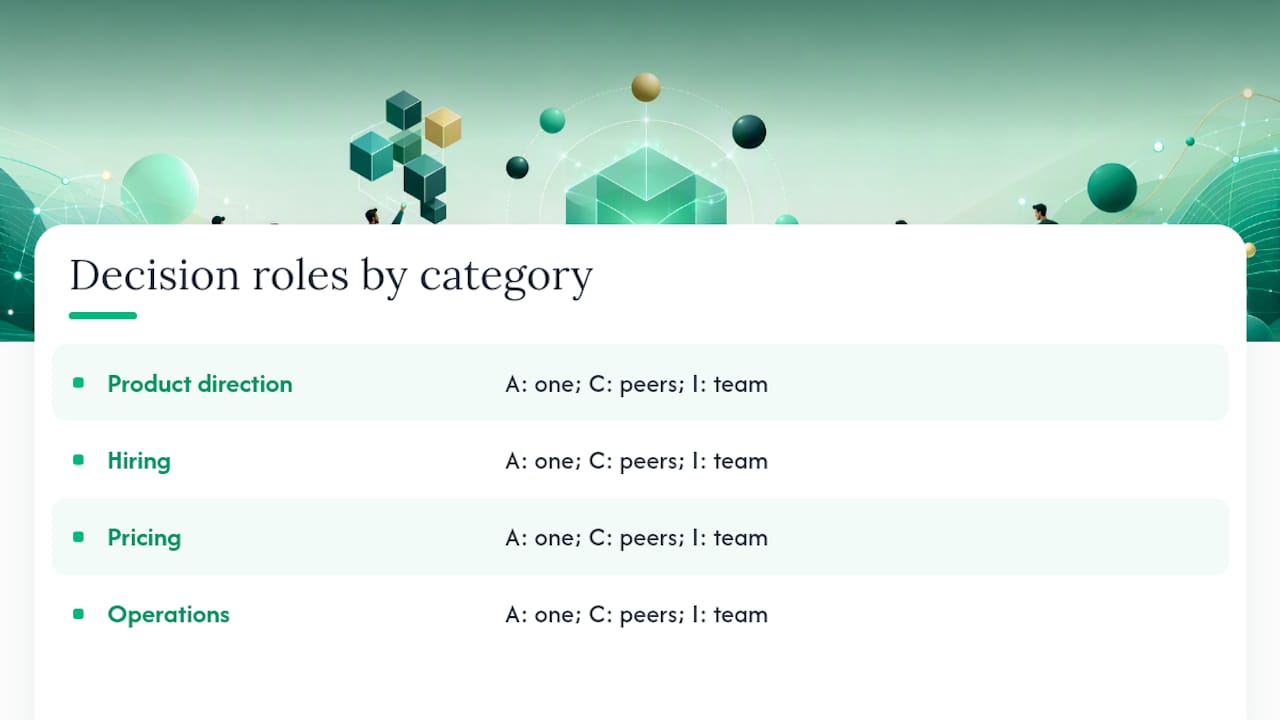
Keep the roles attached to the decision category, not to individuals permanently. A head of engineering might be Accountable for architecture calls and merely Consulted on pricing. Writing this mapping down once, even in a simple table inside your log’s wiki, saves you from re-deciding “who gets a say in this” every single time a new decision comes up.
The mistake to avoid is over-engineering this step. A five-person team doesn’t need four decision categories and a matrix with twelve roles. Two or three categories with one Accountable owner each is enough structure to keep decisions moving without turning every choice into a committee vote. Add categories only when you notice the same type of decision causing confusion about who actually gets to call it.
Where Decision Logs Break Down (And How to Fix It)
The most common failure isn’t laziness, it’s building something too heavy to maintain. Teams that start with a ten-field template, mandatory approval workflows, and a dedicated Slack channel for logging usually abandon the whole system within six weeks. The fix is starting with the five required fields and nothing else.
The second failure is skipping the revisit condition. Entries pile up with no trigger for reopening them, so the log becomes a graveyard nobody checks. Every entry needs one concrete condition, a date, a metric, or a specific assumption, that tells you when to look again.
A third failure: writing for the wrong audience. Entries written as internal justification, defensive and padded, are useless six months later. The better standard is writing for whoever joins the team next quarter and needs to understand the “why” without asking anyone. That framing alone fixes most of the verbosity problem.
Ownership gaps kill logs too. If nobody is explicitly responsible for nudging the team to write entries, the habit dies within a month of launch, usually right after the initial enthusiasm fades. A named, rotating owner with a five-minute weekly task solves this cheaply.
Finally, watch for logs that only capture successes. A record that skips the decisions that didn’t pan out isn’t a learning tool, it’s a highlight reel, and it will actively mislead anyone reviewing it for patterns later.
What Does a Decision Log Look Like Across Different Teams?
The five-field skeleton stays the same everywhere. What changes is the content and the frequency.
A product team logging feature prioritization might write: “Decision: delay the mobile app to Q3. Context: engineering capacity split across two migrations. Alternatives: hire a contractor (rejected, budget), delay the web redesign instead (rejected, higher revenue impact). Who decided: head of product. Revisit if: engineering headcount grows by two before Q3.”
A founder logging a hiring call might write: “Decision: hire a generalist over a specialist for the first ops role. Context: unclear yet which function needs the most support. Alternatives: wait three months to see which gap is bigger (rejected, too slow). Who decided: founder. Revisit if: one function clearly dominates workload by month three.”
An agency logging a client-facing call might write: "Decision: fixed-fee pricing instead of hourly for the new retainer. Context: client pushed back on hourly billing twice. Alternatives: hourly with a cap (rejected, still creates friction). Who decided: account lead.
Same structure, completely different content, and that’s the point: the template is generic enough to fit a five-person startup or a fifty-person agency without modification.
How Should the Log Evolve as the Team Grows?
The template that works for three people will feel too sparse for thirty. Don’t redesign it preemptively. Wait for a specific pain point, usually someone asking “who actually decided this?” and not finding an answer, before adding a field or a category.
Growth usually adds one thing at a time: a second decision category once a new function (say, sales) starts making calls with real consequence. A lightweight approval step once decisions start affecting teams outside the one making them. A tagging system once search by keyword stops being enough and people need to filter by department or quarter.
Resist the urge to add fields “just in case.” Every extra field is friction that makes someone skip logging altogether. The better move as you scale is splitting the log by team or category rather than adding columns to a single unwieldy template, so a ten-person engineering team and a three-person finance team each keep a version that fits their actual decision volume.
What Do You Actually Gain From Running One of These?
The clearest benefit shows up in speed. When responsibility and reasoning are written down, teams stop spending meeting time re-establishing who gets to make a call before they can even discuss the decision itself. That friction, arguing about process before you argue about substance, is where a lot of small-team velocity quietly disappears.
The second benefit is fewer stalled decisions. A named owner per category means nobody is waiting on a group consensus that never quite forms. Decisions that used to take three meetings because “everyone weighs in” get made by one accountable person, informed by the right consulted voices, in a single sitting.
The third benefit compounds over time: fewer repeated arguments. Once a decision and its reasoning are on record, a new hire, or even the original decision maker six months later, can check the log instead of reopening a debate the team already settled. That single habit is often what separates a team that moves fast at thirty people from one that grinds to a halt under its own history.
What I’d Tell a Founder Setting This Up for the First Time
Most founders overbuild the first version. They design six fields, add a formal approval flow, and the whole thing collapses within a month because nobody wants to fill out a form to log a hiring call. Start with five fields and a five-minute habit, not a system.
The second mistake is treating the log as documentation instead of a bet you’re tracking. Write your confidence level down. Be specific about what would prove you wrong. That’s the difference between a journal that teaches you something and a filing cabinet nobody opens.
Consistency beats sophistication here. A rough entry logged every week outperforms a polished template used once and abandoned.
— Phil
Try Betlog: The Structured Way to Track Every Bet You Make
Betlog is built around the exact habit this article describes: document your hypothesis, your confidence level, and your trade-offs before you commit, not after the outcome tells you whether you were right. Where a shared doc or a wiki page depends entirely on your team’s discipline to fill in the revisit conditions and actually search past entries, Betlog structures that in from the start.
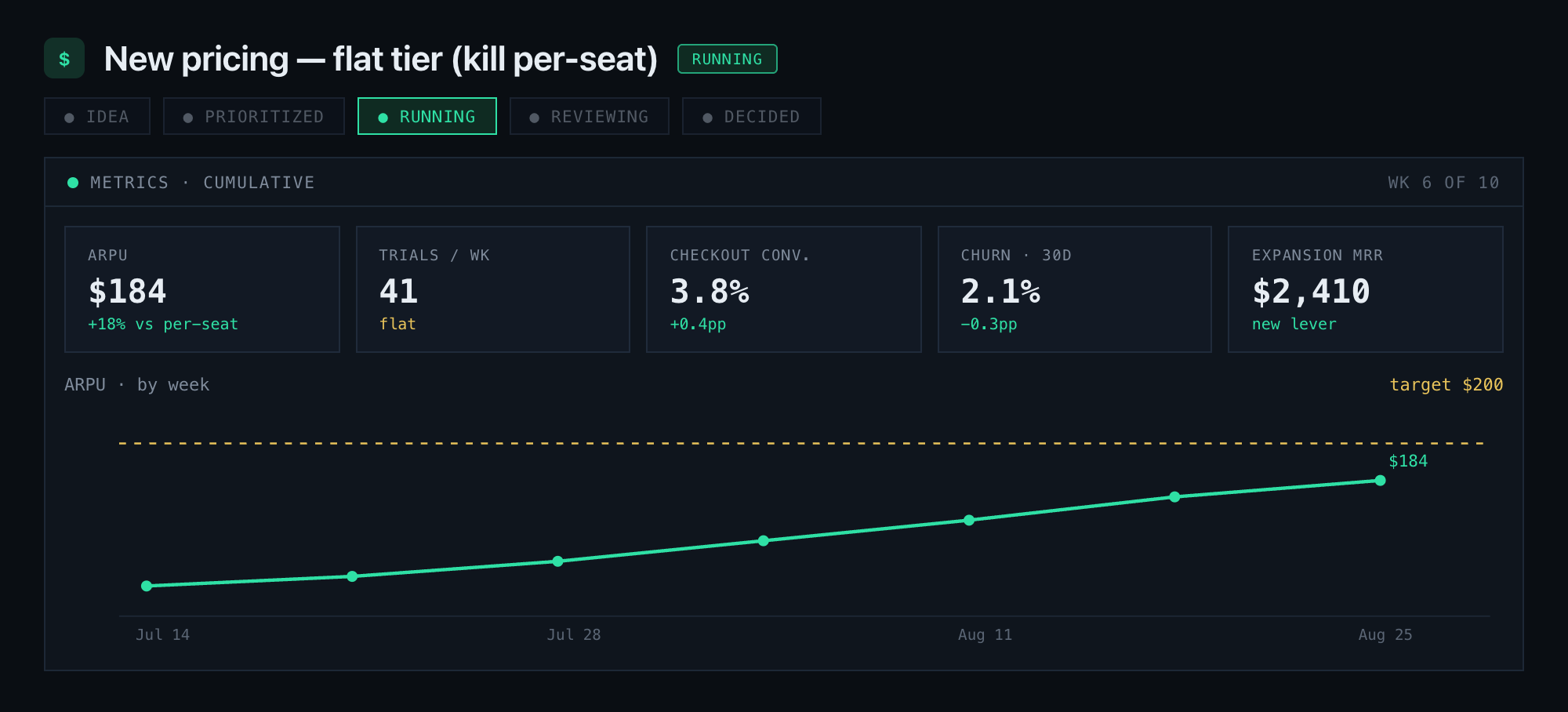
The core idea is simple: a permanent record of every decision, regardless of how it turns out, so your team stops losing the reasoning behind a call the moment the person who made it moves on or forgets. That record is what lets you spot whether your confidence estimates run consistently too high on hiring calls, or whether the same kind of decision keeps getting revisited for the same reason. Founders and small teams use it to track decisions the same way they’d track any other metric that compounds.
If you’re ready to stop relying on memory and Slack scrollback, start a free trial with Betlog and log your next decision before you make it, not after.


