Decision Log Template for Project Managers You Can Copy in 10 Minutes
Copy a project manager's decision log template with schema, worked example, and a 10 min weekly ritual to calibrate bets and track outcomes.

On this page
- What a decision log is and who should use it
- Why use a decision log (benefits and problems it solves)
- When to log a decision: triggers, thresholds, and door types
- Decision log template: field-by-field schema to copy
- How to use the template: filling rules, weekly ritual, and quarterly calibration
- Worked example: one filled decision row and a premortem snippet
- Decision audits and calibration: practitioner playbook
- Practical advice to make decision logging stick
- When a spreadsheet is enough and when you need a tool
- Sources
- FAQ
A decision log template is a simple, one-row-per-decision record that captures what you decided, why, and how confident you were, so you can separate good judgment from good luck later. It gives project managers and team leads a permanent, timestamped account of reasoning instead of a memory that rewrites itself after the fact. Copy the schema below or add your next decision to it now.
TL;DR:
- Decision logs should be used for choices that significantly impact team time, costs, or have customer-facing consequences, especially if they are hard to reverse or involve escalation.
- For high-stakes decisions like price changes or large scope shifts, capture options considered, evidence at the time, confidence levels, and potential signals that would alter the decision.
- Maintain a consistent weekly habit of adding and updating decision entries, with quarterly calibration sessions to compare confidence predictions against actual outcomes.
- Keep the full decision record when tracking dozens of active bets or for audit purposes, but small teams can manage with a simplified version in spreadsheets.
- Use a purpose-built tool for decision tracking when needing uneditable, audit-proof records or calibration across many decisions; otherwise, spreadsheets suffice for low decision volume.
What a decision log is and who should use it
A decision log is a structured record where every significant choice gets its own row: a statement of the decision, the person accountable, the evidence available at the time, and a spot to revisit later. It differs from a running meeting note or a Slack thread because it isolates decisions from discussion, so anyone can scan it and understand what was decided without wading through commentary.
Project managers, product leads, and team leads benefit most because they make frequent calls that affect other people’s time and money, often with incomplete information. A decision log gives them a defensible trail and a training ground for better judgment.
- Project managers use it to track scope, vendor, and staffing calls across a project’s life.
- Product leads use it to record pricing, roadmap, and pivot decisions.
- Team leads use it to document hiring calls and process changes that outlast any one sprint.
You can keep it in a shared spreadsheet, a notes tool, or a dedicated app, as long as everyone with a stake in the decision can read and add to it.
Why use a decision log (benefits and problems it solves)
The biggest problem a decision log solves is “resulting”: judging a decision only by how it turned out rather than by the quality of the thinking behind it. A well-reasoned bet can still lose, and a careless one can still win, so grading decisions on outcome alone teaches the wrong lesson. A log forces you to write the reasoning down before the result is known, which keeps hindsight from rewriting the story.
- It cuts down on repeated mistakes because the same bad assumption gets flagged instead of relearned.
- It clarifies accountability since every row names an owner and an approver.
- It makes audits and postmortems faster because the context is already written, not reconstructed from memory.
Practitioner write-ups describe a workable cadence: roughly 10 minutes a week for logging plus a 45-minute quarterly calibration session is enough to produce a noticeable shift in how well a team’s confidence matches its actual hit rate over several months.
When to log a decision: triggers, thresholds, and door types
Not every choice deserves a row. Logging every lunch order or minor copy tweak buries the decisions that matter under noise. Use clear triggers instead.
- Log it if the commitment consumes more than a week of team time, carries real cost, or is hard to reverse.
- Log it if the decision gets escalated past the immediate team or touches a customer-facing risk.
- Log it if you notice yourselves arguing about the same tradeoff for the second time, since that signals a pattern worth capturing.
One-way doors, decisions you can’t easily undo like a pricing change rolled out to existing customers, need fuller fields: options considered, confidence, and a premortem. Two-way doors, decisions you can reverse cheaply, can skip some of that detail. Active teams tend to land on one to three meaningful entries a week; more than that usually means the bar is set too low.
Decision log template: field-by-field schema to copy
Guidance from SEI/CMU’s architectural decision documentation work and the long-standing architectural decision record format described in Tyree and Akerman’s paper both point to the same core idea: capture context, options, and consequences at the moment of decision, not after. The fields below adapt that structure for project and product work.
- Decision ID: a short code so the row can be referenced elsewhere (D-014).
- Date: use YYYY-MM-DD for sortability.
- Decision statement: one sentence stating what was decided, not the debate around it.
- Owner: the person who executes the decision.
- Decision-maker or approver: the person accountable if it fails.
- Status: a simple taxonomy such as Proposed, Active, Reviewing, Closed.
- Options considered: the alternatives that were on the table.
- Evidence at decision time: only what was known then, never updated later.
- Confidence: a percentage, not a phrase like “pretty sure.”
- What would change my mind: the specific signal that would flip the call.
- Review date: when you’ll check the outcome.
- Outcome: what actually happened.
- Verdict: Won, Killed, or Inconclusive.
- Lessons: the one thing worth remembering next time.
Small teams can run a minimal version with just the statement, owner, confidence, and review date. Larger teams or anyone doing formal audits should keep the full set, since the extra fields are what make a later calibration review possible.
How to use the template: filling rules, weekly ritual, and quarterly calibration
Fill the decision statement, evidence, and confidence fields at the moment you decide, never in hindsight. Evidence should read like a snapshot of what you knew then, not what you later learned.
- Set a recurring 10-minute weekly slot to add new rows and update statuses; protect it like any other meeting.
- Have the owner draft the row and the approver confirm the confidence figure and review date before the entry closes.
- Run a quarterly calibration session: pull every decision due for review, fill in outcomes, and score whether the process was sound independent of how it turned out.
- Group decisions by confidence bucket and check whether your 70%-confidence calls actually landed around 70% of the time, which is the core of practitioner guidance on quarterly calibration reviews.
Store the log somewhere every stakeholder can reach without asking permission, and never edit past entries once a review date passes.
Pro Tip: Write the “what would change my mind” field before you write the confidence number: it forces you to commit to a falsifiable standard instead of a comfortable one.

Worked example: one filled decision row and a premortem snippet
Here is a single filled row for a one-way door decision: raising prices on an existing plan.
- Decision statement: raise the mid-tier plan price by a fixed amount starting next quarter.
- Owner: head of growth.
- Approver: founder.
- Options considered: raise price, grandfather existing customers, hold price and cut features.
- Evidence at decision time: churn has been flat for two quarters and support tickets show low price sensitivity.
- Confidence: 65%.
- What would change my mind: churn rising more than expected within 30 days of the change.
- Review date: 60 days out.
A short premortem before locking the decision asks what could make this fail: a competitor undercuts on price, a vocal customer segment churns publicly, or support volume spikes past capacity. Watching for those signals early lets the team catch a bad bet before the review date arrives. The verdict, when it comes, is scored against the reasoning in the row, not just whether revenue went up.
Decision audits and calibration: practitioner playbook
Scoring calibration means grouping decisions by confidence bucket (50%, 70%, 90%) and comparing each bucket’s stated confidence to its actual hit rate; a large gap between the two is calibration error worth addressing. Open-source decision audit templates structure this by separating pre-decision fields from post-outcome audit fields, which keeps the review honest instead of retrofitted.
- Audit fields worth adding: process evaluation, surprises encountered, lessons learned, and a short bias checklist.
- This approach applies the same discipline: bets move through staged states from Idea to Decided, confidence is recorded as an explicit probability, and every closed bet gets an honest verdict of Won, Killed, or Inconclusive.
- Records are timestamped and uneditable after the fact, which is what makes the later audit trustworthy.
Pro Tip: Run the audit on the process, not the person: ask “was this a reasonable bet given what we knew” before asking “did it work.”
Practical advice to make decision logging stick
The usual objection is that logging takes too long. The fix is to keep entries to one sentence per field and have leaders log their own decisions first, since teams copy what they see rewarded. Fold the ritual into a meeting that already exists rather than inventing a new one. The payoff shows up months later: faster onboarding for new hires who can read the history, and fewer arguments about decisions everyone remembers differently.
— Cesar
When a spreadsheet is enough and when you need a tool
A spreadsheet works fine for a small team logging a handful of decisions a month. Once you’re running quarterly calibration audits, tracking probabilities across dozens of open bets, or trying to keep records that nobody can quietly edit after the fact, a purpose-built tool earns its keep.
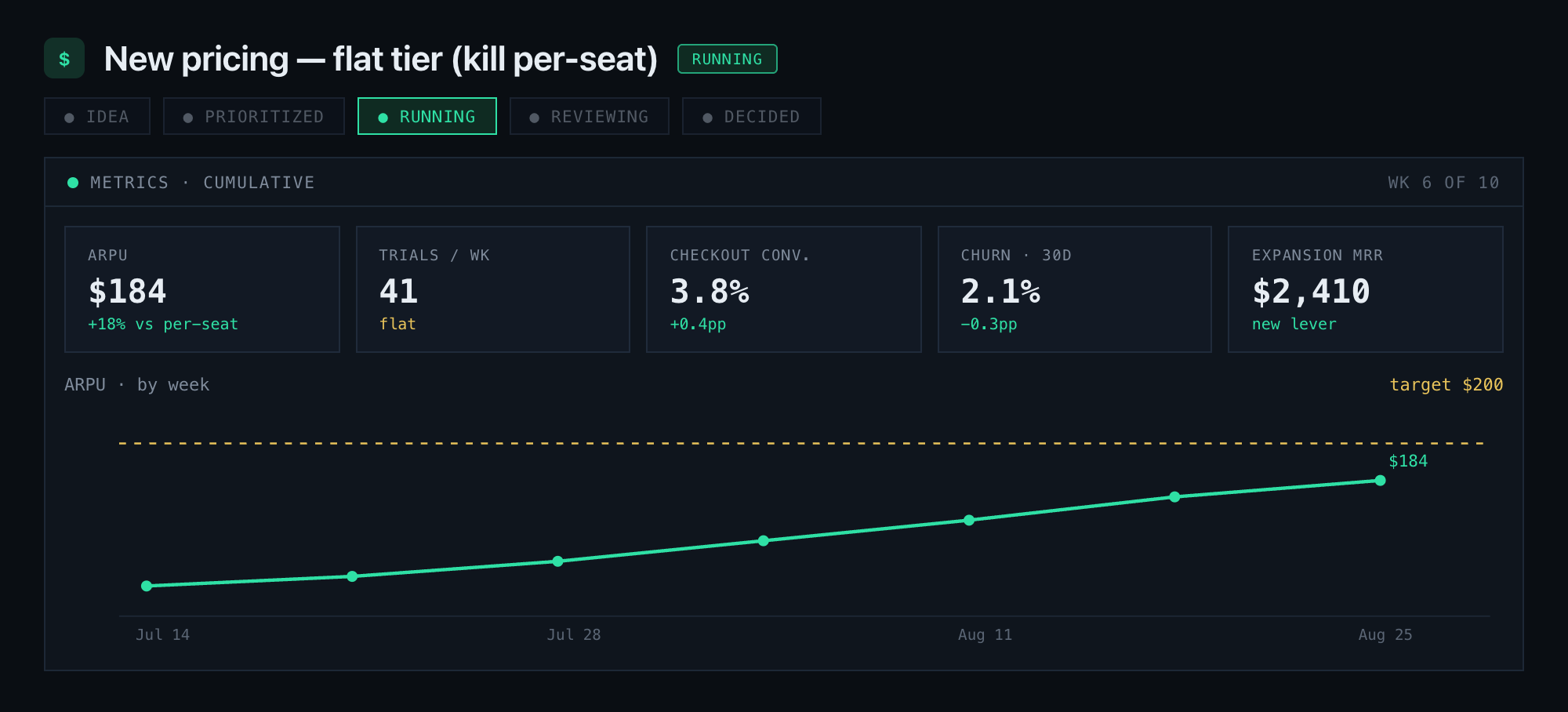
Betlog is built around that exact problem: bets carry explicit probabilities instead of vague confidence, move through staged states from Idea to Decided, and close with a permanent, timestamped postmortem that separates skill from luck.
- Choose a tool when you need audit-proof records and calibration tracking across a team.
- Choose a spreadsheet when volume is low and no one needs an uneditable history.
Betlog runs on one plan at $39 per month or $390 per year. Check the Betlog product page to see how staged bets and postmortems work before you commit.
Sources
Start with the decision audit template on GitHub and Falkster’s decision log walkthrough for copyable formats.
- SEI/CMU: Architectural decision documentation guidance
- Tyree — Architectural decision records (ADR) paper
- U.S. Government Accountability Office (GAO) on documented decision processes
- decision-audit-template — GitHub
- The Decision Log Template: Train Judgment Like a Muscle — Falkster
FAQ
How do I create a decision log?
Start with a simple table containing a decision statement, owner, confidence percentage, and review date, then add a row every time a decision meets your logging threshold. Keep entries short enough to fill in under two minutes so the habit survives busy weeks.
What should be included in a decision log?
At minimum, include a decision statement, owner, approver, confidence level, evidence available at the time, a review date, and an eventual outcome and verdict. SEI/CMU’s guidance on decision documentation emphasizes capturing evidence and options at the moment of decision so the record stays accurate.
Where can I find a free decision tree template?
Several open-source and blog resources publish copyable decision-support templates, including the decision audit template on GitHub, though most are structured as decision logs rather than branching decision trees. Search for spreadsheet or markdown versions if you need something you can adapt quickly.
What is a decision log?
A decision log is a structured record, typically one row per decision, that captures what was decided, who owns it, how confident the team was, and what eventually happened. It exists to separate the quality of a decision from the luck of its outcome, a distinction GAO’s guidance on documented decision processes ties to stronger accountability and traceability.


